Introducing Venuera Calendar: A WordPress Event Calendar for Every Event You Run

Six venues, four stages, and a lineup that changes every week. Somewhere behind the bar there is a laminated “what’s on” sheet, and it went stale about three weeks ago.
The problem is not that venues do not have events. It is that every event lives on its own page, and nobody reads forty pages to work out what is on tonight. People want the answer in one place, on a calendar they can actually look at and move through. That is what we are shipping today. It is called Venuera Calendar, a new premium WordPress event calendar plugin, and it puts every event you run on one public calendar.
One calendar. Three ways to read it.
The same events, presented the way people actually look for them.
Drop a Venuera Calendar block in the editor or paste a [venuera_calendar] shortcode on any page – both ship the same calendar with the same options.
- Month grid – the whole month on one page, busy days folding behind a “+N more” toggle instead of spilling over.
- Week strip – seven days side by side, today marked.
- List – what is next, with the featured image, venue, time and a ticket link.
Visitors flip between the three from the calendar header, move through months and filter by category. None of it needs JavaScript: every view, month, category and the past-events toggle are real links, so each one has its own URL.
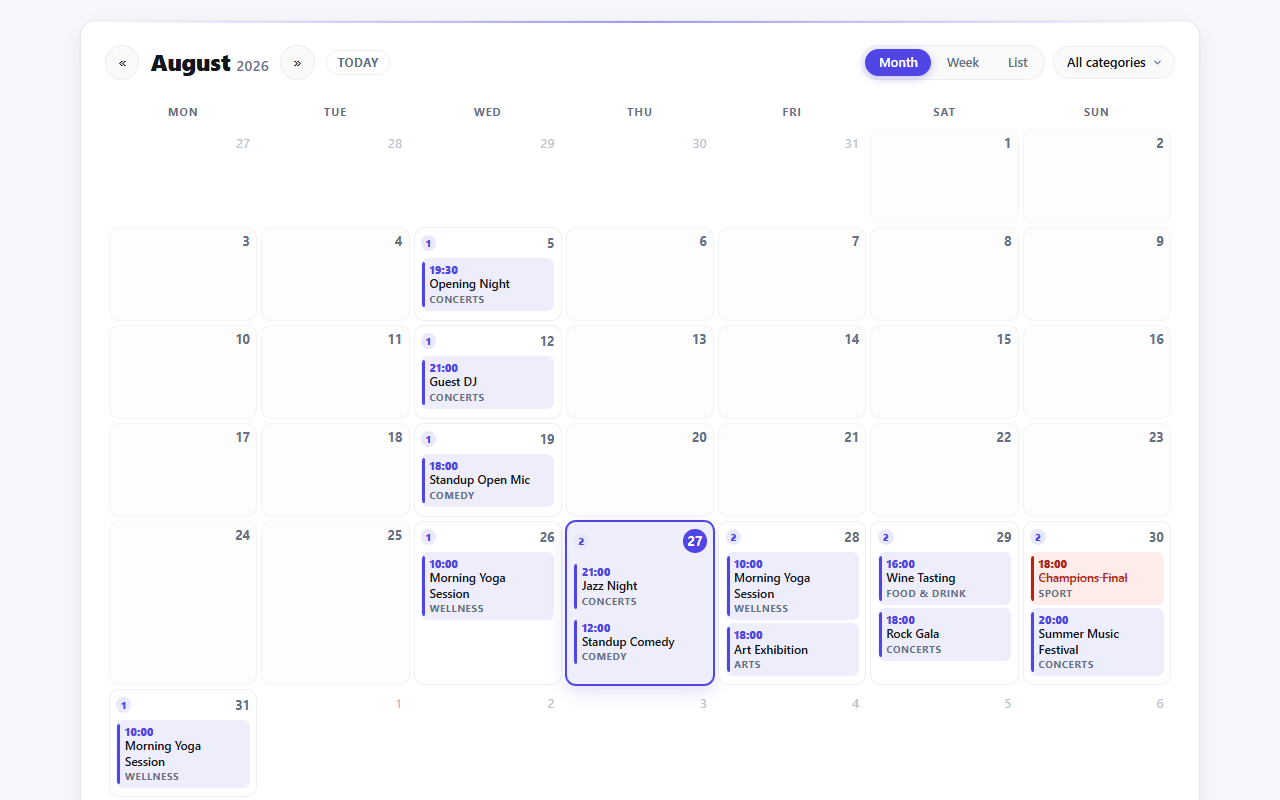
What Calendar does
Every event type, in one place
Single-date, multi-day, online and venue events all show up. Sold-out dates get a label, and a “Get tickets” button only appears when a ticket product actually exists. Today is highlighted, and each view has its own empty state.
Recurring series, over their real dates
A weekly class shows on every night it runs, not once. Each occurrence gets its own cell, bounded to the period on screen. You need the Recurring Events add-on for this.
Filter by category
A dropdown pulled from your event categories, with an “All” option – so a calendar set for one category can still be widened by the visitor.
Details on hover
Hover over an event, or tab onto it, and a card opens with the featured image, the date and time, the venue or “Online”, the category, and whether tickets remain or are sold out.
No JavaScript required
Months, weeks, categories and the past-events toggle all navigate through query links rendered on the server. Scripts only layer the tooltip and the “+N more” toggle on top.
Wears your event style
The calendar reads the same minimal, bold or dark preset your event pages use and pulls in the design tokens, instead of fighting your theme.
One shortcode, or one block
Drop a shortcode on any page and every event lands on a calendar:
[venuera_calendar view="month" category="" show_past="no" max_events="12"]
The block does the same thing, with a real multi-select for categories and a live preview in the editor. Four options cover it: view (month, week or list), category (comma-separated slugs, empty for all), show_past (no or yes) and max_events (caps the list view, and the per-day limit in the grid and week views).
How to get it
Calendar runs on the free Venuera core and is a premium add-on. On its own it’s $49 a year; the All-Access bundle, which unlocks every premium add-on, is $99 a year. No per-ticket fees, ever, and every purchase is covered by a 7-day money-back guarantee.
Where to go next
The Calendar documentation walks through setup, the views and options, the shortcode and block, and what each date shows. If you run recurring events, the add-on spreads every occurrence across its real dates. Everything you run, in one place you can point people at – that was the whole idea.