Create a recurring schedule
you run the same event on many dates - a weekly class, a nightly show, a tour - and don’t want to create a separate event for each one.
The Recurring Events add-on turns a single Venuera event into a series of dated occurrences generated from one schedule. You manage one event – one description, one set of ticket products, one set of reports – and buyers pick the date they want. This guide walks through every option in the recurrence builder and what it does.
Turn recurrence on
Edit the event and, in the Event Details box, tick “This is a recurring event.” That reveals the recurrence builder with all the options below. Untick it and the event goes back to being a single, one-off date.
The schedule is always anchored to the event’s own start date and time – that first date is occurrence #1, and the pattern generates forward from there. So set the event’s start accurately first; the time of day you give it is the time each occurrence inherits (unless you restrict times with a window, below).
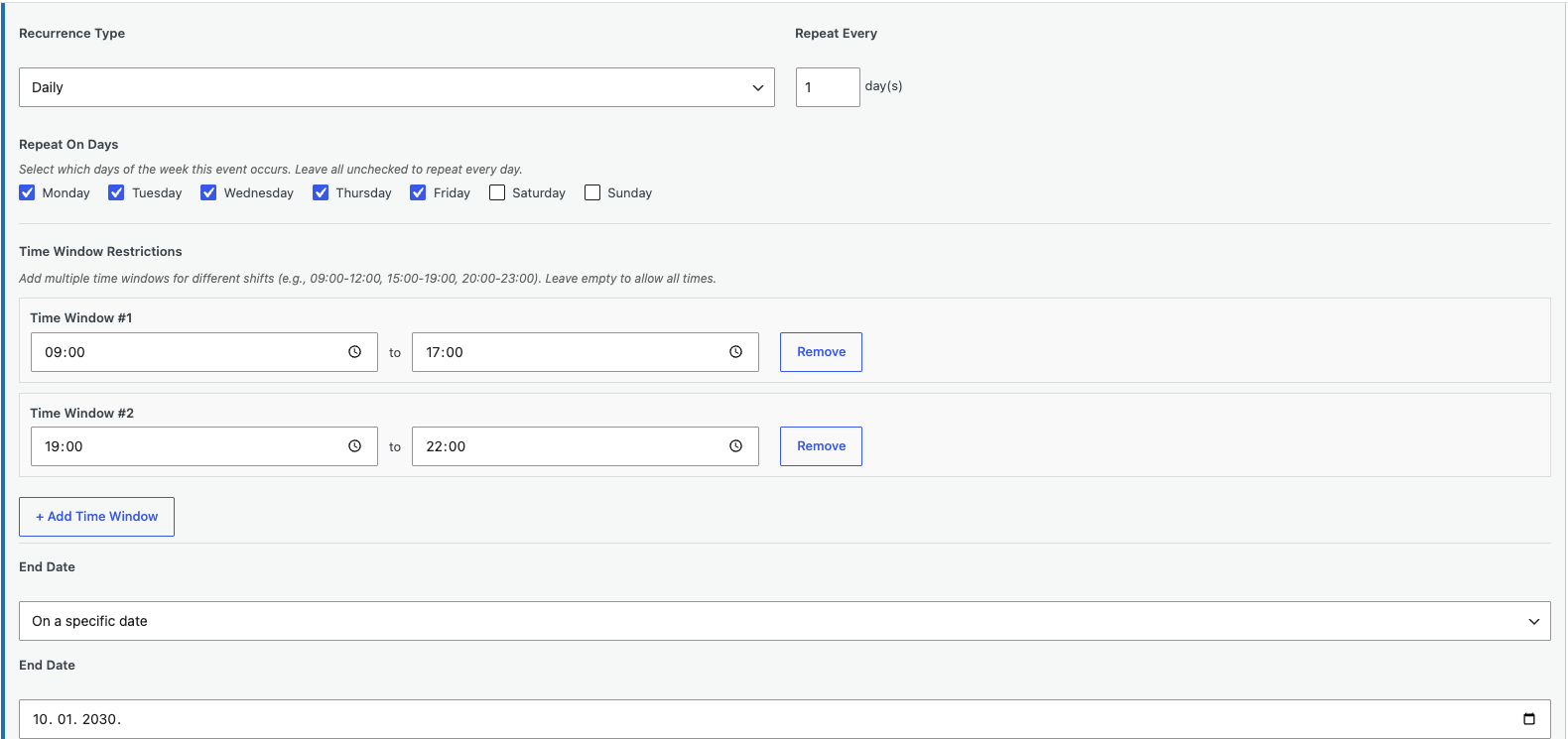
Recurrence Type & “Repeat Every”
Recurrence Type is the core of the pattern – it decides the unit the series repeats on. Repeat Every sits next to it and multiplies that unit, so you can repeat every 1 week, every 2 weeks, every 3 days, and so on. There are five types:
- By the minute (time slots) – creates back-to-back slots within a day, e.g. a slot every 30 minutes. Ideal for tours, escape rooms, tastings or anything sold in short timed entries. Pair it with a time window and a break (both below) so slots only run during opening hours.
- Hourly – the same idea on an hourly cadence (every hour, every 2 hours…). Good for hourly classes or screenings.
- Daily – repeats every day (or every N days). Combine with Repeat On Days to limit it to certain weekdays.
- Weekly – repeats every week (or every N weeks) on the weekdays you choose under Repeat On Days – e.g. every Tuesday and Thursday.
- Monthly – repeats every month (or every N months) using the Monthly pattern rule below.
The builder shows and hides the other fields based on the type you pick, so you only ever see the options that apply.
Repeat On Days (weekdays)
Shown for the by-the-minute, hourly, daily and weekly types. Tick the weekdays the event should fall on – Monday, Wednesday, Friday for a class, say. For a daily or slot pattern, leaving every box unchecked repeats on all seven days; for a weekly pattern, leaving them unchecked falls back to just the event’s own start weekday, so tick the days you want.
Monthly pattern
Shown only for the monthly type, with two modes (both derived from your first-occurrence date):
- Day of the month – repeats on the same calendar date, e.g. the 15th of each month. In shorter months the date is clamped to the last day, so “the 31st” becomes the 30th (or 28th/29th in February) rather than skipping the month.
- Nth weekday – repeats on the same weekday position, e.g. “the third Friday” of each month. Useful for a monthly meetup or club night that should always land on the same weekday rather than the same number. If your first date is in the last week of the month, it tracks the last weekday (e.g. the last Friday) each month.
Break after each
Shown for the by-the-minute and hourly types only. This adds buffer or cleanup time between slots, measured in minutes. The slot length comes from your event’s start/end; the break is added on top. For example, a 1-hour class with a 30-minute break runs at 09:00, 10:30, 12:00, and so on – leaving time to reset the room between groups.
Time Window Restrictions
Shown for the by-the-minute, hourly and daily types. By default a slot pattern would run around the clock; time windows confine it to your real opening hours. Add one or more windows – for example 09:00–12:00 and 15:00–19:00 – and slots are only created inside them, so you can model a morning and an evening shift with a closed afternoon. Leave it empty to allow all times.
Excluded Dates
Available whenever recurrence is on. Add specific calendar dates the pattern should skip – public holidays, a maintenance day, a one-off closure. An excluded date is dropped from the series entirely: it isn’t offered on the event page and no tickets are sold for it, while every other date keeps selling. (See skip or exclude a single date for more.)
End Date
Controls how far the series runs. Three options:
- Never (default) – the series rolls on indefinitely; Venuera keeps generating upcoming occurrences as time passes.
- After X occurrences – stops after a set number of dates (default 10). Good for a fixed course or a limited run.
- On a specific date – stops on the calendar date you choose.
Generated dates (preview)
Below the rule is a live preview of the first dates your pattern will create. It’s produced by the same generator that builds the real occurrences, so what you see is exactly what you’ll get – adjust any setting above and the preview updates immediately. Use it to sanity-check the cadence before you publish.
Frontend Display Options
These control how buyers interact with the dates on the event page.
Occurrence Selection
- Auto-select first upcoming occurrence (default) – no date picker is shown; the page displays “Next available: <date>” and the buyer simply gets that next date. Best when “the next session” is all anyone needs.
- Let customer choose occurrence – shows a date picker so buyers select exactly which date they want. This is what you use for a schedule where dates genuinely differ.
Picker style
Shown only when selection is set to Let customer choose. Pick how the dates are presented (it applies to both ticket and seated/venue events):
- Dropdown list (default) – a compact list of upcoming dates.
- Calendar grid – a month calendar with available dates highlighted.
- Date & time picker – a date-then-time selector, handy for many slots per day.
Display Limit
Shown only in Let customer choose mode. The maximum number of upcoming occurrences to show the buyer at once (default 10, up to 100). This applies to the Dropdown style; the Calendar and Date & time pickers load a wider range so buyers can browse further ahead.
Booking Cutoff
How long before an occurrence’s start time its ticket sales should close – entered as a number plus a unit of minutes, hours or days. For example, set 2 hours and a date stops selling two hours before it begins. Set it to 0 (the default) for no cutoff, so a date sells right up to its start.
Why not just duplicate the event?
Because everything stays in one place. One product sells across all dates, reporting rolls up per occurrence, and a change to the description or artwork applies everywhere at once. It also keeps your events list clean instead of cluttered with one entry per night.
How occurrences are identified
Each occurrence carries its own start time, which the check-in rules use for time-based windows – so an “event window” rule opens and closes around the right date automatically, even for a long-running series, and a ticket bought for one date returns Wrong event if scanned on another.
Next step
Control capacity and seating per date in per-date availability & seat maps.