Add custom fields
you need more than a name from each attendee - a phone number, a T-shirt size, a dietary preference, a consent checkbox.
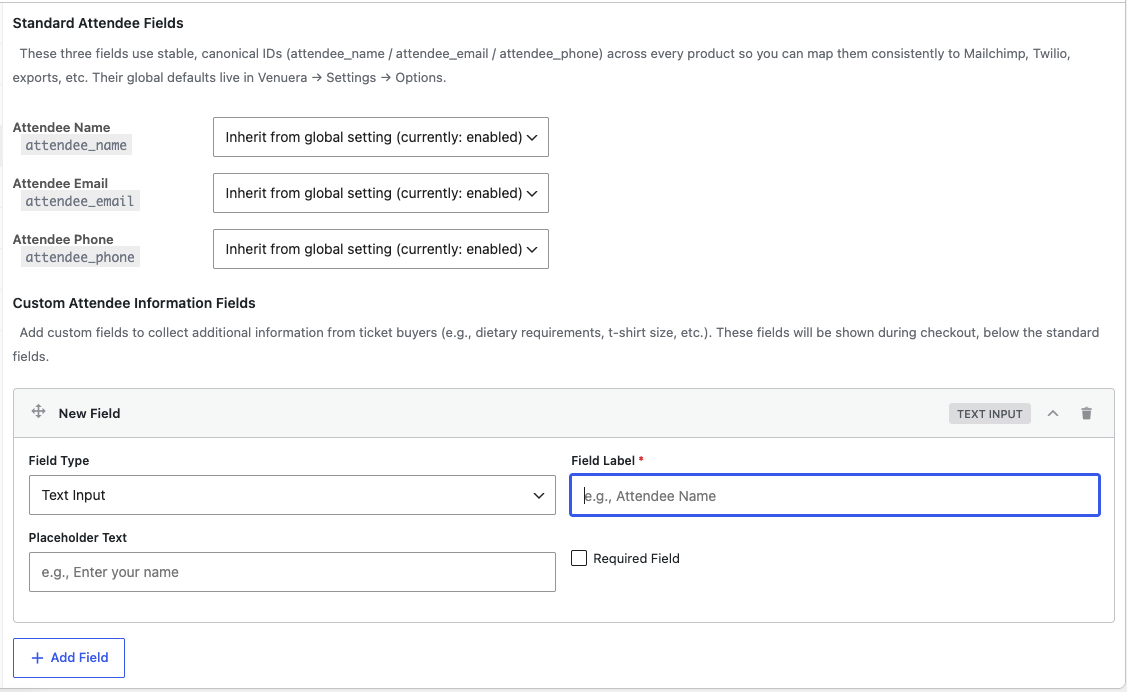
The Custom Attendee Fields add-on lets you collect exactly the information each event needs, from every ticket holder – not just the buyer. You define the questions and they appear at checkout. (Attendee fields apply to event-ticket products. Three built-in fields – Attendee Name, Email and Phone – can also be switched on per ticket type, or globally under Venuera → Settings → Options.)
Add a field
- Open the product (ticket type) and find the attendee fields configuration in the product editor.
- Add a field, give it a label, and choose its type (text, dropdown, checkbox and more – see field types).
- Mark it required if attendees must answer it.
- Save. The field now appears for each ticket in the cart at checkout.
Per ticket, not per order
The fields are collected per attendee. Buy four tickets and the buyer fills the questions four times – one set per person – so a group booking still captures every guest’s details, not just the purchaser’s.
Where the answers go
Answers are stored against each ticket, shown on the order, can be printed on the ticket via the Ticket Designer, and are included when you export attendees.