Zones & standing areas
not every part of your room has numbered seats - you have a standing pit, a lawn, or general-admission sections that just need a capacity.
A real venue is rarely one flat block of seats. The Venue Designer gives you two different tools for structuring it: zones to organise the map into sections, and standing areas for general-admission space. They’re often confused, so here’s exactly what each one is.
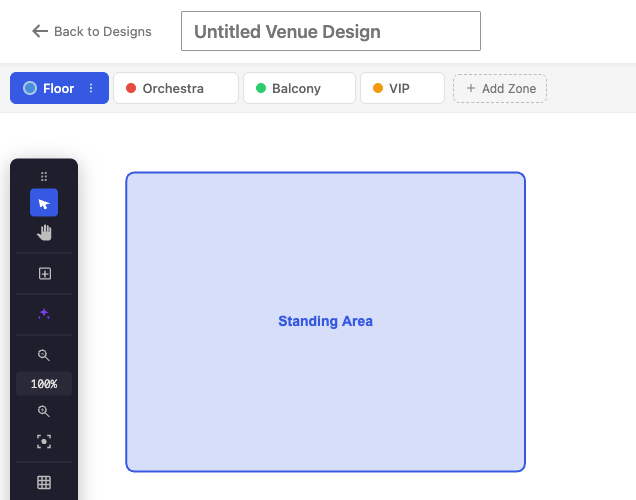
Zones – sections of the venue
A zone is a named section of your venue – Orchestra, Balcony, VIP, Floor, or anything custom. Each zone is its own workspace (a tab in the editor) with its own seats, tables and standing areas, so you build a large or multi-level room by adding a zone per section and laying each one out separately, instead of cramming everything onto a single canvas.
On the event page, buyers get matching zone tabs to move between sections (the tabs are hidden when a venue has only one zone), and a very large zone automatically switches to the fast overview renderer. A zone is purely an organising and navigation layer – it does not carry its own price or capacity. Those live on the seats and areas inside it.
Standing areas – general admission
A standing area is an open, general-admission block you draw on the map for space sold by capacity rather than by individual seat – a standing pit, a GA balcony section, a lawn. Give it a name and link it to a ticket type; buyers who choose it get a general-admission ticket, and how many can be sold is governed by that ticket’s stock – there is no separate capacity number on the area itself.
Mix seated and standing
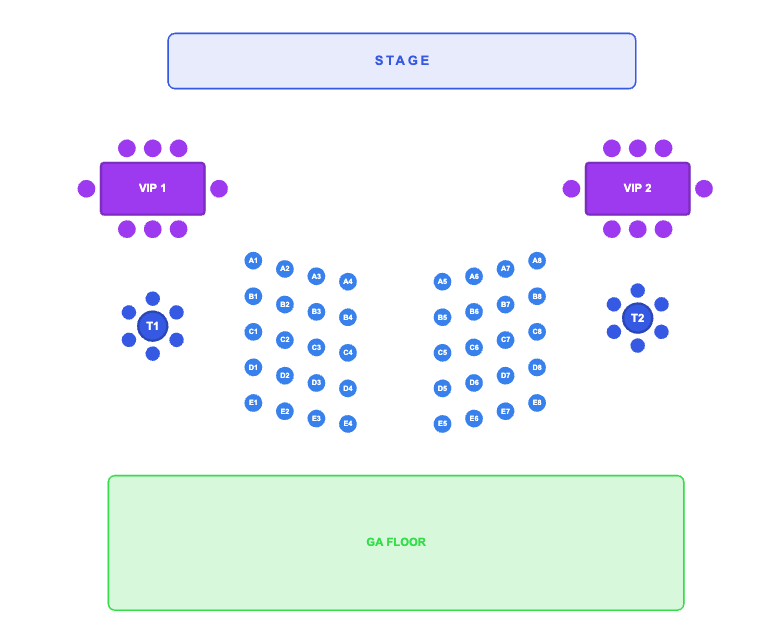
A single venue – and even a single zone – can mix numbered rows with one or more standing areas, each tracked independently: reserved seats are held seat-by-seat, while a standing area simply sells down its linked ticket’s stock. Buyers see the whole section and pick what they want – an exact seat, or a spot in a standing area. (You can also drop in a decorative Stage element for orientation; it’s never bookable.)
Pricing comes from the linked ticket type
You don’t set a price on the seat or area itself. You link each area to a ticket type (a WooCommerce product), and its price is whatever you set on that product – so a front block, a rear block and a standing area each point to their own ticket type and price. See per-seat & per-zone pricing.