Build your receipt
you want the printed or on-screen receipt to carry your branding, the right details, and look like it belongs to your venue.
The POS receipt is configurable so it matches your business and gives the buyer what they need.
Customise it
Set up the receipt with your business name and logo, the line items and totals, payment method and change, and any footer text you need (returns policy, support contact, a thank-you). The result is a tidy receipt for cash or card sales.
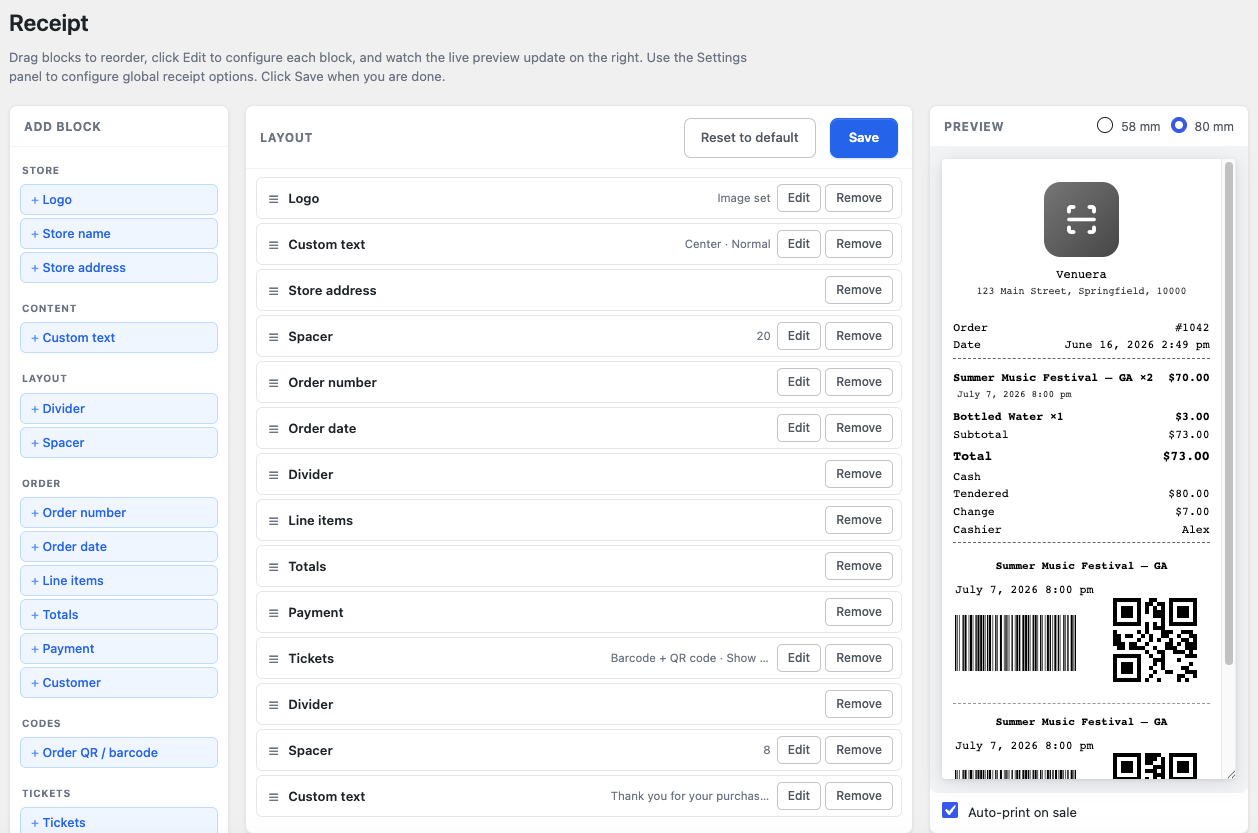
Receipt and ticket are separate – but the receipt can do both
The receipt is proof of purchase; the ticket (with its QR) is what normally gets scanned at the door. A buyer can have both – a receipt for their records and a ticket for entry – or just the ticket if that’s all they need.
But the receipt can also carry a scannable code itself. In the Receipt Builder you can add an Order QR / barcode block (QR, barcode, or both) that encodes the order number, and the Venuera ticket designer can add per-ticket details to the receipt too. That opens up a faster workflow for some organisers.
Use the order code to check in a whole group at once
When you scan an order’s QR/barcode at the door, Venuera looks up every ticket on that order and checks them all in at once – ideal for a family or a group that arrives together, so you don’t scan each person separately. Because of this, an organiser can run a door entirely from receipts: print the order code on the receipt, scan it on arrival, and the whole party is admitted in one tap (every ticket still runs the same check-in rules, so duplicates and wrong dates are still caught).