Refunds & shift reports
you need to undo a sale at the counter, and at the end of the night you need to know exactly what each cashier took.
A door till has to handle mistakes and money counts as well as sales. The POS does both.
Refunds
Refund a sale directly from the POS. The matching WooCommerce order is refunded. On a full refund the order is marked refunded, which (with the Venuera venue/ticketing add-ons) invalidates the ticket – it returns an invalid result if scanned at the door – and releases the seat or slot for resale. A partial refund returns money but does not release seats.
Shift reports
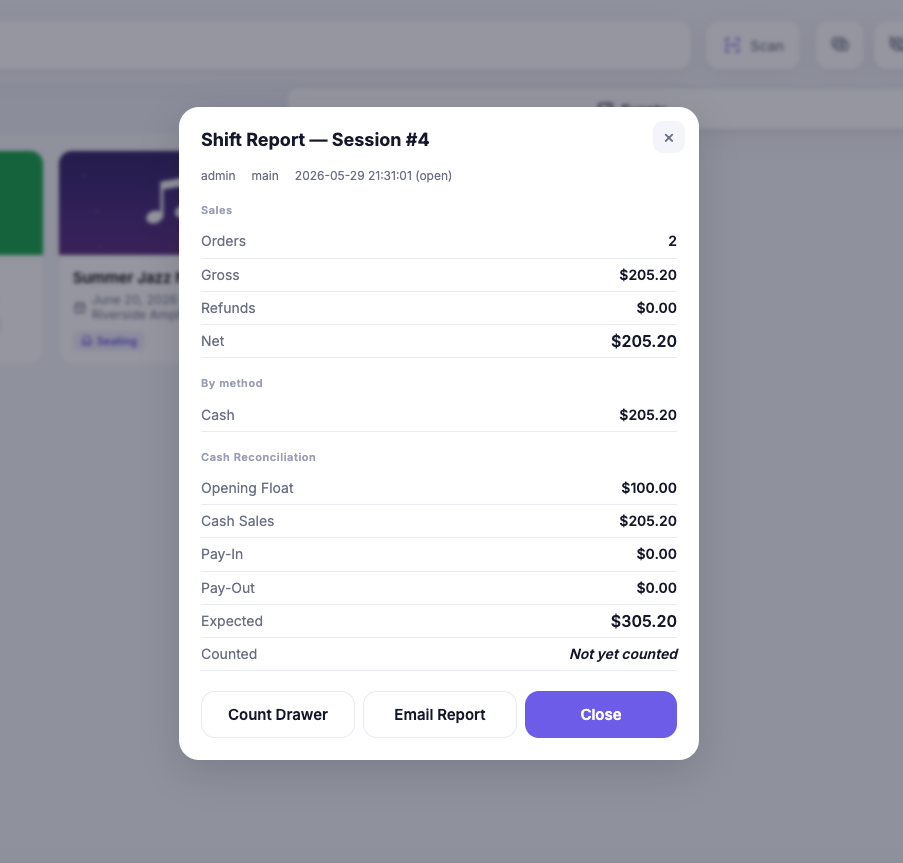
At the end of a session the POS gives a shift (X/Z) report for that register: cash and card taken, opening float, pay-ins and pay-outs, and expected versus counted cash with any variance. Use it to count the drawer before handing over. For totals across cashiers and days, use the POS Reports dashboard.
Next step
For overall event totals across online and door sales, see Sales & check-in reports.